Generative UI with Vercel AI SDK: Streaming React Components from AI
Learn how to build Generative UI in Next.js using the Vercel AI SDK's streamUI function. Covers streaming React components from AI tools, skeleton loading states, tool registries, and when to use Generative UI over plain text streaming.
Introduction#
Most AI features in web applications follow the same pattern: the user sends a message, the model generates text, and the interface renders that text in a chat bubble. This pattern is clean and familiar, but it is also limiting. Text is not always the best medium for communicating structured information. A weather query deserves a weather card. A flight search deserves an interactive table. A data analysis question deserves a chart. Forcing every AI response through a plain text pipeline means leaving significant user experience value on the table.
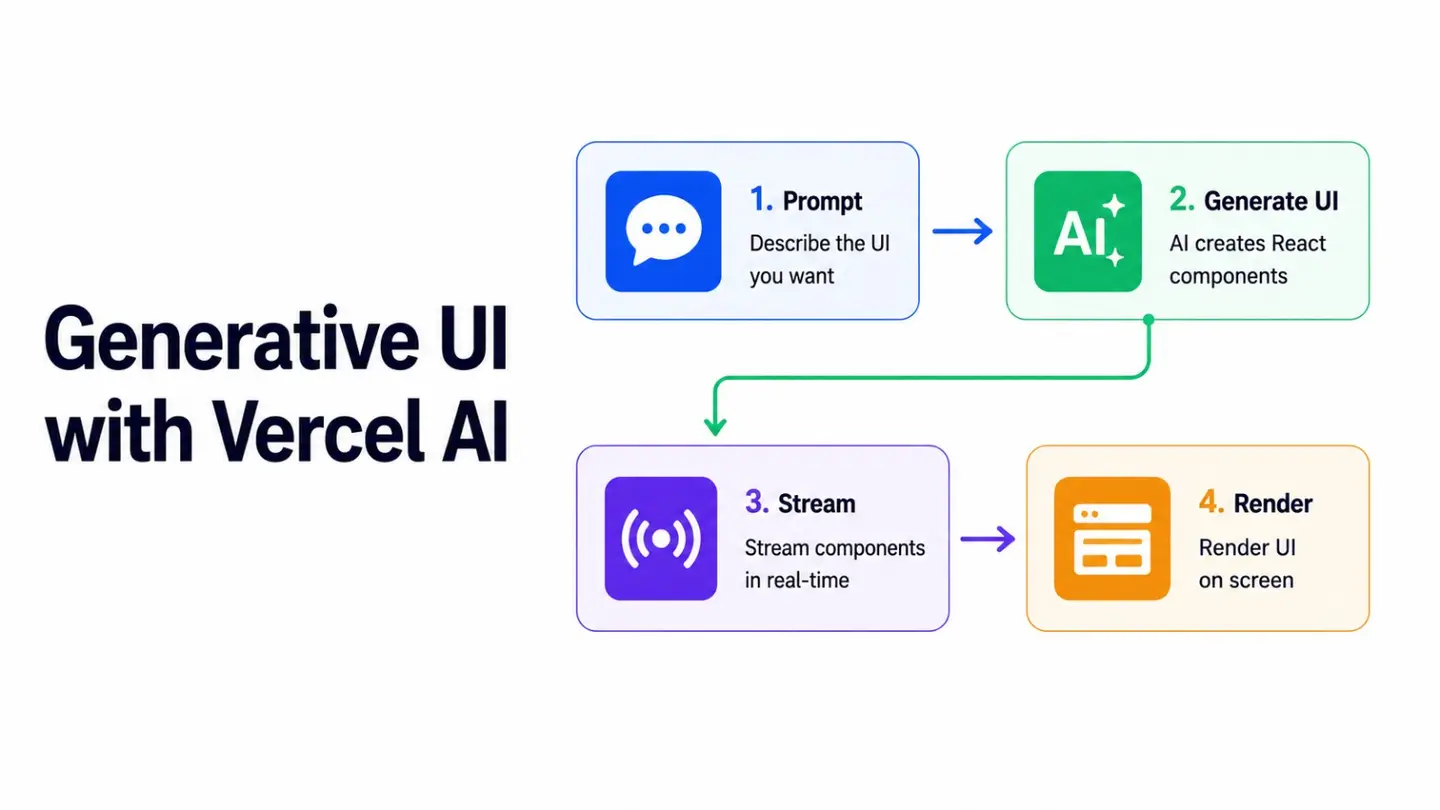
Generative UI changes this equation. Instead of asking the model to describe information in text, Generative UI enables the model to invoke tools that return actual React components. The result is a conversational interface where the AI’s responses can include rich, interactive UI elements rendered inline, streamed progressively, and composed naturally alongside text. This pattern has gained substantial traction in 2026 and represents one of the most meaningful advances in AI-driven frontend development.
This article explains how Generative UI works, how to implement it with the Vercel AI SDK and Next.js, and how to design a scalable tool registry that keeps the architecture maintainable as the number of tools grows.
How Generative UI Works#
The core mechanism is straightforward. When a language model determines that a user’s request is best answered by structured data rather than prose, it invokes a tool with typed parameters. In standard tool calling, this tool returns a data object that the model incorporates into its text response. In Generative UI, the tool’s generate function returns a React component instead.
The Vercel AI SDK’s streamUI function is the primary API for this pattern. It extends standard tool calling with a generate function that is an async generator, meaning it can yield a loading skeleton immediately while data is being fetched, then return the fully rendered component once the data is ready. This two-phase approach eliminates the jarring blank state between user request and final render.
// The two-phase generate pattern
generate: async function* ({ city }) {
  // Phase 1: yield a loading state immediately
  yield <WeatherSkeleton city={city} />;

  // Fetch the actual data
  const data = await fetchWeatherData(city);

  // Phase 2: return the final component
  return <WeatherCard data={data} />;
}
From the user’s perspective, the experience is seamless. The loading skeleton appears instantly, and the final component materializes in place once data arrives. No spinner, no text describing a loading state, no blank white box.
Setting Up Generative UI with the AI SDK#
Generative UI in the Vercel AI SDK uses React Server Components (RSC) and Server Actions. The AI logic runs on the server and streams RSC payloads to the client, which means sensitive API keys and data-fetching logic never reach the browser.
Start by creating a server action that wraps the streamUI call.
// app/actions.ts
'use server';

import { streamUI } from 'ai/rsc';
import { openai } from '@ai-sdk/openai';
import { z } from 'zod';
import { createStreamableValue } from 'ai/rsc';
import { WeatherCard, WeatherSkeleton } from '@/components/weather';
import { StockChart, StockSkeleton } from '@/components/stock';

export async function submitMessage(userMessage: string) {
  const result = await streamUI({
    model: openai('gpt-4o'),
    system: `You are a helpful assistant. Use the available tools when the user asks about
             weather or stock prices. For all other questions, respond with text.`,
    messages: [{ role: 'user', content: userMessage }],
    text: ({ content, done }) => {
      return <p className="text-gray-800 leading-relaxed">{content}</p>;
    },
    tools: {
      getWeather: {
        description: 'Get the current weather for a specific city',
        parameters: z.object({
          city: z.string().describe('The city name'),
          unit: z.enum(['celsius', 'fahrenheit']).default('celsius'),
        }),
        generate: async function* ({ city, unit }) {
          yield <WeatherSkeleton city={city} />;
          const data = await fetchWeather(city, unit);
          return <WeatherCard data={data} />;
        },
      },
      getStockPrice: {
        description: 'Get the current stock price and chart for a ticker symbol',
        parameters: z.object({
          ticker: z.string().describe('Stock ticker symbol, e.g. AAPL, MSFT'),
        }),
        generate: async function* ({ ticker }) {
          yield <StockSkeleton ticker={ticker} />;
          const data = await fetchStockData(ticker);
          return <StockChart data={data} />;
        },
      },
    },
  });

  return result.value;
}
Building the UI Components#
Each Generative UI tool needs two components: a skeleton for the loading state and a fully rendered component for the final state. Matching the skeleton’s layout to the final component’s layout minimizes layout shift and creates a smooth transition.
// components/weather.tsx

// Loading skeleton
export function WeatherSkeleton({ city }: { city: string }) {
  return (
    <div className="bg-blue-50 rounded-xl p-4 max-w-xs animate-pulse">
      <div className="h-4 bg-blue-200 rounded w-24 mb-2" />
      <div className="h-8 bg-blue-200 rounded w-16 mb-1" />
      <div className="h-3 bg-blue-200 rounded w-20" />
    </div>
  );
}

// Final component
type WeatherData = {
  city: string;
  temperature: number;
  condition: string;
  humidity: number;
  feelsLike: number;
  unit: string;
};

export function WeatherCard({ data }: { data: WeatherData }) {
  const conditionLabel: Record<string, string> = {
    sunny: 'Sunny',
    cloudy: 'Cloudy',
    rainy: 'Rainy',
    'partly cloudy': 'Partly Cloudy',
    stormy: 'Stormy',
  };

  return (
    <div className="bg-gradient-to-br from-blue-400 to-blue-600 text-white rounded-xl p-5 max-w-xs shadow-lg">
      <div className="flex justify-between items-start">
        <div>
          <h3 className="font-semibold text-lg">{data.city}</h3>
          <p className="text-blue-100 text-sm">{data.condition}</p>
        </div>
        <span className="text-sm font-medium bg-blue-700 px-2 py-1 rounded-lg">
          {conditionLabel[data.condition.toLowerCase()] ?? 'Unknown'}
        </span>
      </div>
      <div className="mt-4">
        <span className="text-4xl font-bold">
          {data.temperature}°{data.unit === 'celsius' ? 'C' : 'F'}
        </span>
      </div>
      <div className="mt-3 flex gap-4 text-sm text-blue-100">
        <span>Feels like {data.feelsLike}°</span>
        <span>Humidity {data.humidity}%</span>
      </div>
    </div>
  );
}
The Client-Side Interface#
The client component manages the message history as an array of React nodes, rather than strings. This is the key architectural shift in Generative UI, where messages are rendered UI elements rather than raw text.
'use client';

import { useState } from 'react';
import { submitMessage } from '@/app/actions';

type Message = {
  id: string;
  role: 'user' | 'assistant';
  content: React.ReactNode;
};

export function GenerativeChat() {
  const [messages, setMessages] = useState<Message[]>([]);
  const [input, setInput] = useState('');
  const [isLoading, setIsLoading] = useState(false);

  async function handleSubmit(e: React.FormEvent) {
    e.preventDefault();
    if (!input.trim() || isLoading) return;

    const userMessage = input;
    setInput('');

    // Add user message immediately
    setMessages((prev) => [
      ...prev,
      {
        id: crypto.randomUUID(),
        role: 'user',
        content: <p>{userMessage}</p>,
      },
    ]);

    setIsLoading(true);

    try {
      // Call the server action
      const assistantNode = await submitMessage(userMessage);

      setMessages((prev) => [
        ...prev,
        {
          id: crypto.randomUUID(),
          role: 'assistant',
          content: assistantNode,
        },
      ]);
    } finally {
      setIsLoading(false);
    }
  }

  return (
    <div className="flex flex-col h-screen max-w-3xl mx-auto">
      <div className="flex-1 overflow-y-auto p-6 space-y-4">
        {messages.map((message) => (
          <div
            key={message.id}
            className={`flex ${message.role === 'user' ? 'justify-end' : 'justify-start'}`}
          >
            <div
              className={`max-w-prose ${
                message.role === 'user'
                  ? 'bg-blue-600 text-white px-4 py-3 rounded-2xl rounded-br-sm text-sm'
                  : 'text-gray-900'
              }`}
            >
              {message.content}
            </div>
          </div>
        ))}
      </div>

      <div className="border-t p-4">
        <form onSubmit={handleSubmit} className="flex gap-3">
          <input
            value={input}
            onChange={(e) => setInput(e.target.value)}
            placeholder="Ask about weather, stocks, or anything else..."
            disabled={isLoading}
            className="flex-1 px-4 py-2.5 border rounded-xl text-sm
                       focus:outline-none focus:ring-2 focus:ring-blue-500"
          />
          <button
            type="submit"
            disabled={isLoading || !input.trim()}
            className="px-5 py-2.5 bg-blue-600 text-white rounded-xl text-sm
                       font-medium disabled:opacity-50 transition-colors hover:bg-blue-700"
          >
            Send
          </button>
        </form>
      </div>
    </div>
  );
}
Scaling with a Tool Registry#
As the number of Generative UI tools grows, defining them inline in a single server action becomes unwieldy. A tool registry pattern separates tool definitions from the orchestration layer, making each tool independently testable and the overall system much easier to extend.
// lib/genui-registry.ts
import { z } from 'zod';
import { WeatherCard, WeatherSkeleton } from '@/components/weather';
import { StockChart, StockSkeleton } from '@/components/stock';
import { FlightResults, FlightSkeleton } from '@/components/flights';

export const toolRegistry = {
  getWeather: {
    description: 'Get current weather for a city',
    parameters: z.object({
      city: z.string(),
      unit: z.enum(['celsius', 'fahrenheit']).default('celsius'),
    }),
    skeleton: WeatherSkeleton,
    component: WeatherCard,
    fetch: async (params: { city: string; unit: string }) =>
      fetchWeatherData(params.city, params.unit),
  },
  getStockPrice: {
    description: 'Get stock price and chart for a ticker',
    parameters: z.object({ ticker: z.string() }),
    skeleton: StockSkeleton,
    component: StockChart,
    fetch: async (params: { ticker: string }) =>
      fetchStockData(params.ticker),
  },
  searchFlights: {
    description: 'Search for available flights between two cities',
    parameters: z.object({
      from: z.string().describe('Departure city'),
      to: z.string().describe('Destination city'),
      date: z.string().describe('Travel date in YYYY-MM-DD format'),
    }),
    skeleton: FlightSkeleton,
    component: FlightResults,
    fetch: async (params: { from: string; to: string; date: string }) =>
      fetchFlightData(params),
  },
};

// Build streamUI tools from registry
export function buildStreamUITools() {
  return Object.fromEntries(
    Object.entries(toolRegistry).map(([name, definition]) => [
      name,
      {
        description: definition.description,
        parameters: definition.parameters,
        generate: async function* (params: unknown) {
          const Skeleton = definition.skeleton as React.FC<typeof params>;
          yield <Skeleton {...(params as object)} />;
          const data = await definition.fetch(params as never);
          const Component = definition.component as React.FC<{ data: typeof data }>;
          return <Component data={data} />;
        },
      },
    ])
  );
}
With this registry, adding a new Generative UI tool requires only adding an entry to toolRegistry. The orchestration layer and streaming logic remain untouched.
When to Use Generative UI#
Generative UI is a powerful pattern, but it is not the right choice for every AI feature. Plain text streaming works perfectly well for conversational responses, long-form content, and any output where the structure is inherently open-ended.
Generative UI adds significant value when the data being returned has a predictable, structured shape that benefits from visual presentation. Weather, financial data, search results, itineraries, product listings, and dashboard summaries are all strong candidates. The guiding question is whether a user would prefer to read information or see it.
It is also worth considering the maintenance overhead. Each tool requires a matching component, a skeleton, and a data-fetching function. For a small number of high-value tools, this is a worthwhile investment. For low-frequency or simple use cases, the overhead may not be justified.
Conclusion#
Generative UI represents a meaningful evolution in how AI integrates with frontend interfaces. By enabling language models to return React components instead of text strings, it closes the gap between conversational AI and the richly interactive interfaces that users expect from modern web applications.
The Vercel AI SDK’s streamUI function, combined with the two-phase skeleton-to-component generator pattern and a clean tool registry, gives frontend engineers a practical and scalable foundation for building these experiences. The result is AI features that do not just answer questions; they show the answers in the most useful form possible.
References#
Vercel AI SDK Documentation (ai-sdk.dev)
The Developer’s Guide to Generative UI (copilotkit.ai)
The Complete Guide to Generative UI Frameworks (medium.com)
Generative UI in React: A Practical Guide (generativeui.ru)
Building Generative UI with Vercel AI SDK and Next.js (writerdock.in)
Generative UI Chatbot Template with React Server Components (vercel.com)
Last updated